Your CRM, inside your inbox:
tasks, deals and info at a glance.
Bring your Leadconnector CRM, into your Gmail inbox
Boost Productivity, work directly from your inbox, and 'M‑Sync' data directly from your CRM.
Emails That M‑Sync,
To A CRM That Delivers.
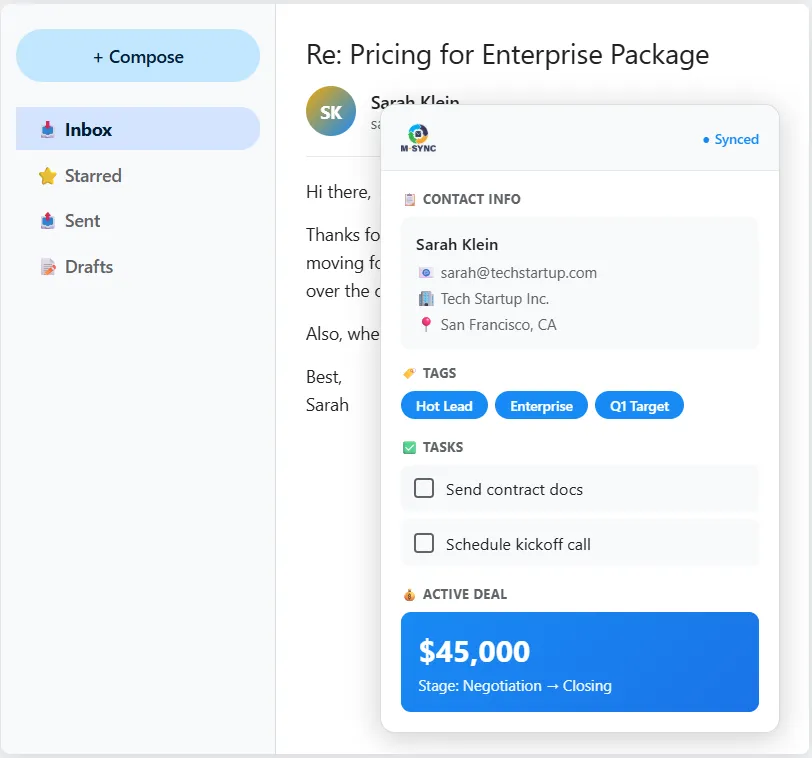
M‑Sync is a Chrome Extension that shows CRM contact details, latest tasks, deals, notes, and tags directly beside the email. If the sender isn’t in your CRM, M‑Sync them in seconds*.
Unlock Every Feature, No Limits
Reply faster and stay fully up to date — without leaving Gmail or Outlook.
See GoHighLevel contacts, tasks, deals, appointments & tags directly in Gmail and Outlook. Update your CRM without ever leaving your inbox.
Stop switching tabs. See LeadConnector / GoHighLevel context while you write the email.
*Built for LeadConnector and GoHighLevel users. Works in Gmail and Outlook (desktop/web).
Used by agencies and sales teams who live in their inbox.
Designed to reduce admin time and missed follow-ups.
Works with LeadConnector / GoHighLevel today.
The challenge we solve
Your business deserves a solution that doesn’t just grow—it evolves with you. Leverage seamless data connections with M‑Sync to stay ahead of the competition.
A Smarter Way to Optimize Performance
You open an email, start replying… then you pause. Who are they again? What was promised? Where is the deal at?
So you jump into your CRM. Search. Click. Scroll. Update notes. Create a task. Jump back to the inbox. Repeat — dozens of times a day.
M‑Sync puts the CRM context right where you need it: inside your inbox, beside the email you are replying to.
Less switching. Fewer missed details.
Faster replies — with cleaner CRM data.

How It Works

Install
Install the Chrome Extension and sign in with your licence.
Open
Open Gmail or Outlook and click the M‑Sync widget to see CRM context instantly.

M-Sync
Create or update tasks, apply tags to trigger workflows, and check deal status — without opening the CRM.
Core Features
Tasks: Create and update tasks from the email view so follow-ups never slip. Save precious time and reduce missed actions.
Create a follow-up task in seconds, without breaking your reply flow.
Update due dates and status while the conversation is fresh.
Keep your CRM actions list accurate, without extra admin.
Tags → workflows: Apply a tag inside the widget to trigger automations and workflows instantly — without logging into the CRM. Start a sales process with one click.
Add a tag in the widget to move contacts into the right workflow.
Standardise your process across the team (no ‘forgot to tag’ problem).
Turn an email reply into a tracked, automated journey in one action.
Deals: See the latest deals and opportunities while replying, so you can respond with confidence and make faster decisions.
See pipeline stage and latest opportunity notes before you hit send.
Reduce awkward ‘Where are we at?’ replies by having context immediately.
Keep momentum with quicker, more relevant responses.
Appointments: View upcoming appointments directly from your inbox and create new ones in seconds. No need to open the CRM—simply check schedules, add meetings, and keep your pipeline moving without leaving Gmail or Outlook.
View upcoming CRM appointments directly within Gmail or Outlook.
Create new meetings instantly without logging into your CRM.
Stay organised and keep conversations moving while managing your schedule.
Email Snippets: Respond faster with pre-built, branded email snippets pulled directly from your CRM. Insert consistent, professional replies instantly, helping you maintain messaging quality while saving valuable time on repetitive responses.
Insert pre-built, branded email responses directly from your CRM.
Maintain consistent messaging across your team and communications.
Save time on repetitive replies while responding faster to clients.
Why It Works
Most CRM tools promise efficiency, yet the reality is that many businesses still switch constantly between their inbox and their CRM. M‑Sync helps reduce that friction by bringing the most useful CRM information directly into the place where conversations already happen.
By showing context, enabling quick updates, and allowing simple actions without leaving your email, the extension helps reduce admin time while improving consistency and follow-up across your sales process.
What this means in practice:
• You respond with context – Tasks, notes, tags and deal information are visible while you write, helping you reply with the right information at the right time.
• You reduce friction – Fewer logins, fewer browser tabs, and fewer interruptions between your inbox and your CRM.
• You keep data cleaner – Updates happen at the point of communication rather than hours later when details may be forgotten.
• You protect your time – Less manual admin means more focus on sales conversations and client relationships.
• You schedule faster – View upcoming appointments or create new ones directly from your inbox without opening your CRM.
• You communicate consistently – Insert approved email snippets from your CRM so responses stay professional, accurate and on-brand.

If you save just 2 minutes per email across 20 emails a day, that is around 40 minutes saved daily.
Over a working week, that can quickly add up to several hours that can be reinvested into sales, service, and growth activities.
The aim is simple: reduce friction in your workflow and help your CRM support your conversations rather than interrupt them.
Who it is For

GHL & Marketing Agencies
Offer M‑Sync to your clients as part of your agency offering — helping you build added-value.

HighLevel / LeadConnector Users
Work quicker and with less admin by keeping CRM context beside the email you’re replying to.

Sales & Service Teams
Keep follow-ups tight, reduce missed tasks, and reply with the right context every time.
FREE
Best for:
Trying M‑Sync and light usage
10 Credits per month
Core Widget:
Emails, Tasks, Appointments, Tags
No Credit Card Required
ESSENTIAL
Best For:
Daily inbox users and teams
Unlimited Credits per month
Core Widget:
Emails, Tasks, Appointments, Tags
Cancel at anytime
New User Discount included
ANNUAL
Best For:
Longer Commitments
Unlimited Credits per month
Core Widget:
Emails, Tasks, Appointments, Tags
Annual Discounted Price:
12 months for the price of 8
12 months for the price of 8
Frequently Asked Questions
We know you might have questions before getting started. Here are answers to some of the most common queries about our platform and services.
1. What exactly does M‑Sync do?
M‑Sync adds a sidebar widget inside Gmail and Outlook that shows CRM context for the email sender. You can view key CRM details and take actions like creating tasks, applying tags, and checking deal status — without leaving your inbox.
2. Does it work with LeadConnector and GoHighLevel?
Yes. M‑Sync currently supports LeadConnector and GoHighLevel (GHL). If you're not using Highlevel, you can sign up directly here
3. Does it work in both Gmail and Outlook?
Absolutely! It’s designed for Gmail and Outlook desktop/web experience in Chrome. If your Outlook setup is restricted by corporate policies, you may need your IT team to allow the extension. Remember, as it is a Chrome extension, it only works on desktop web browsers. This does not work in the Outlook Desktop or Mobile Apps.
4. What happens if the email sender is not in my CRM?
You can ‘M‑Sync’ the sender to your CRM from the widget. Once synced, their CRM context becomes available for future emails.
5. What are credits on the Free plan?
A credit is used when you sync a new contact from your inbox to the CRM. The Free plan includes 10 credits. Once you reach the limit, you can upgrade to our ESSENTIAL plan to keep syncing or wait until the start of your next month.
6. Is there a free trial?
Yes. You get a FREE plan (Forever) so you can test M‑Sync with real conversations and see the time-saving benefits before committing to the ESSENTIAL or ANNUAL Plan.
7. Can I create and update tasks from the widget?
Yes. M‑Sync lets you create and update tasks while you are reading or replying to an email, helping you keep follow-ups consistent and reducing missed actions.
8. How do tags help me?
Tags can be used to trigger workflows in LeadConnector / GoHighLevel. With M‑Sync, you can apply a tag from the inbox to start automations without logging in to the CRM.
9. Do you offer white labelling?
Not yet. White labelling is in development. If this is important to you, register your interest, and we’ll notify you when it becomes available.
10. Do you have an affiliate programme?
Yes. You can join our affiliate programme and earn rewards for introducing new users. Use the affiliate sign-up link on this page.
11. Does it work with other CRMs?
Not at this time. Our focus is on delivering an excellent experience for LeadConnector / GoHighLevel. We’re exploring support for other CRMs in the future, and we will announce updates when they become ready.
12. How do I get the extension and licence?
After you sign up and choose a plan, you’ll receive a Chrome Extension download link and your licence details. Install the extension, sign in, and start using M‑Sync immediately.
13. Is my data safe?
M‑Sync only uses the access needed to identify the sender and display the related CRM information in the widget.